AI Video Background Remover
Remove distracting video backgrounds in seconds using AI. Automatically detect the subject, cut out the background cleanly, and export a polished video for reels, ads, product demos, and more.
Processing...
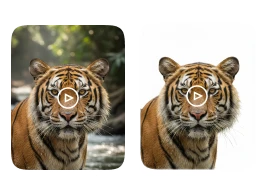
Upload Your Video
or drag and drop MP4, MOV or WEBM
How Does AI Video Background Remover Work?
Remove video backgrounds in three simple steps with our AI video background remover that detects your subject and separates it from the background automatically.
Step 1
Upload Your Video
- Upload the video you want to edit. The tool supports common video formats and prepares your footage for AI-based subject detection and background removal.
Step 2
AI Background Removal
- The AI analyzes each frame to identify the main subject (person, product, or object) and removes the background while keeping edges clean. You can then keep the background transparent or replace it with a new background for a professional look.
Step 3
Preview and Download
- Preview the result to check cutout quality and smooth edges, then download the final video in high quality for social media, marketing, eCommerce, or presentations.
Discover More AI Tools


FAQs
Get clear answers to common questions about using RemixAI.
An AI video background remover is a tool that automatically detects the main subject in a video and removes the background using artificial intelligence, creating a clean cutout for editing or background replacement.
Yes, you can remove a video background online. Just upload your video and the AI will process it without needing complex editing software.
Yes, you can use the AI Video Background Remover for free. Upload your video, remove the background, and download the edited result in a few clicks.
It works best on videos where the subject is clearly visible and separated from the background, talking-head videos, product demos, tutorials, and short-form social clips.
Yes. The AI can remove backgrounds without a green screen by detecting the subject and separating it from the environment frame by frame.
Yes, after removing the background you can replace it with a solid color, a custom image/video background, or a cleaner scene depending on the tool’s options.
The AI is designed to preserve fine details like hair and clothing edges as much as possible. Results can vary based on lighting, motion blur, and video quality.
No. Our AI tool is beginner-friendly, upload, remove background, preview, and download. No advanced editing skills are required.