Free Image Background Remover Online
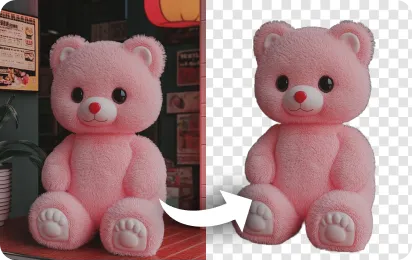
Quickly remove backgrounds from any image with RemixAI’s ai background remover.
Processing...

Upload Your Original Image
or drag and drop PNG, JPG or WEBP
Sample Images
How To Remove Background from Image?
Follow the simple steps to remove background from your image:
Step 1
Upload Your Image
- Choose a clear, well-lit image with a visible subject to remove the background.
Step 2
Click Remove Background
- Click the button to remove the background in high quality.
Step 3
Download & Share
- Download it and use it instantly in your next project.
Some Examples of AI Background Remover
Discover More AI Tools

FAQs About AI Background Remover
Get clear answers to common questions about using RemixAI.
Our RemixAI tool offers fast and accurate background removal in seconds.
Just upload your image on our tool from your phone, no app needed.
It usually takes just a few seconds to remove the background.
Yes, our AI tool keeps your image quality and clear after removing the background.