Remove Wrinkles From Photo With AI
Easily remove wrinkles from your photos using AI. The tool smooths skin while keeping natural facial details intact, delivering polished results quickly.
Processing...
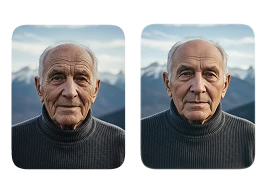
Upload Your Original Image
or drag and drop PNG, JPG or WEBP
Sample Images
How to Use Remove Wrinkles From Photo?
Follow these simple steps to remove wrinkles from your photos.
Step 1
Upload Image
- Upload the photo from which you want to remove wrinkles.
Step 2
Apply Image Effect
- Once uploaded, our AI will automatically detect and remove wrinkles from the image.
Step 3
Download & Share
- Download your enhanced photo and share it with friends and family.
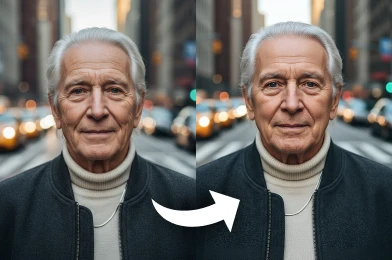
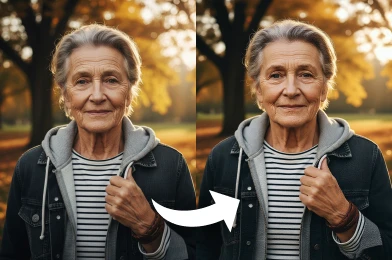
Before & After Transformations
See Other Cool Image Effects



FAQs About Remove Wrinkles From Photo
Get clear answers to common questions about using RemixAI.
The 'Remove Wrinkles From Photo' tool is an AI-powered image effect designed to intelligently identify and smooth out facial wrinkles in your photographs. It enhances the image to create a more youthful and refreshed appearance while keeping the results natural-looking.
The processing time can vary slightly depending on the complexity and resolution of your photo. However, our AI is highly optimized for speed, typically delivering your enhanced image in just a few seconds—often faster than competing tools.
Yes, you can get started for free. Simply sign up for an account on our website, and we will provide you with complimentary credits. You can use these free credits to try our 'Remove Wrinkles From Photo' tool and other AI effects.
Absolutely. Remix AI prioritize your privacy and security. Your photos are uploaded using a secure, encrypted connection. They are only used for the editing process and are automatically deleted from our servers shortly after. We never use or share your images for any other purpose.
Our AI is designed to produce subtle and realistic results. It reduces the appearance of wrinkles while carefully preserving essential skin texture and the subject's unique facial characteristics, ensuring the final image looks enhanced, not artificial.
For the best outcome, we recommend using clear, high-resolution photos where the face is well-lit and in focus. The tool can work on various photos, but higher quality images allow our AI to make more precise and effective adjustments.
We support all major image formats, including JPG, PNG, and WEBP. You can easily upload your photo in any of these standard formats to begin the wrinkle removal process.