Free Jewelry AI Filter
Discover Remix AI Jewelry AI Filter for free virtual jewelry try-on, AI jewelry styling, and accurate photo-based jewelry identification.
Processing...

Upload Your Original Image
or drag and drop PNG, JPG or WEBP
Sample Images
How to Use Jewelry AI Filter?
Virtually try on different jewelry styles using our AI filter in just three easy steps.
Step 1
Upload Your Photo
- Select a clear, front-facing photo of yourself to begin the virtual try-on process.
Step 2
Apply Jewelry Filter
- Click Apply Image Filter, and our AI will automatically place jewelry on your image to look realistic.
Step 3
Download & Share
- Save the new image with the virtual jewelry to your device or share it with friends.
Visual Results You'll Love
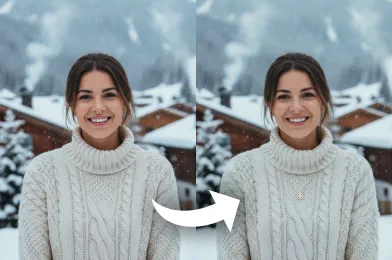
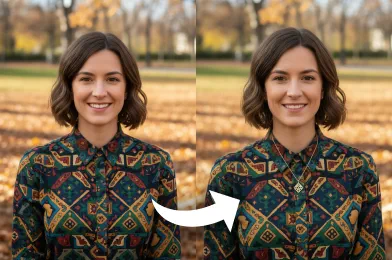
Try More Popular Image Effects



Frequently Asked Questions About Jewelry AI Filter
Get clear answers to common questions about using RemixAI.
The Jewelry AI Filter lets you virtually try on rings, necklaces, earrings, watches, and bracelets using AI, providing a realistic preview of how each piece looks on you.
Simply upload a photo or use your camera. Our AI detects your features and overlays the selected jewelry in real time, giving you a lifelike virtual try-on experience.
Yes, after trying on jewelry, you can save your images or share them directly on social media from the tool.
Remix AI provides a realistic visual preview of jewelry, but the actual fit may vary depending on the physical dimensions of the pieces.
Yes, the Jewelry AI Filter works seamlessly on both mobile and desktop browsers.