Add Confetti to Photo
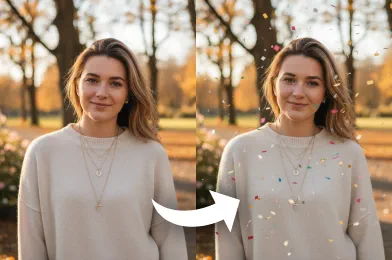
Add confetti to your photos with an AI-powered confetti effect. Upload your image, choose your confetti style, and get a polished celebration-ready photo in moments.
Processing...

Upload Your Original Image
or drag and drop PNG, JPG or WEBP
Sample Images
How to Add Confetti to Photo?
Follow these simple steps to add a festive confetti overlay to your pictures.
Step 1
Upload Your Photo
- Begin by selecting and uploading the photo you wish to enhance with a confetti effect.
Step 2
Apply Confetti Effect
- Choose your preferred confetti style and adjust its settings to complement your image.
Step 3
Download Your Creation
- Once satisfied, download the newly decorated photo to your device for saving and sharing.
What Incredible Results Await You

Check Out Other Trending Image Effects



FAQs About Add Confetti to Photo
Get clear answers to common questions about using RemixAI.
The 'Add Confetti to Photo' is an AI-powered image effect that intelligently applies a realistic and celebratory confetti overlay to your pictures, instantly transforming them into festive moments.
Our AI analyzes your photo and automatically places confetti in a natural, realistic way, matching the lighting and composition of your image.
Our AI attempts to preserve key features in your image, but you can adjust the effect strength if you need more control.
Absolutely. We prioritize your privacy. Your photos are uploaded via a secure connection, processed, and are not stored on our servers or used for any other purpose. Your images remain completely confidential.
You can choose between realistic confetti, stylized options, or more playful designs depending on your preference.
Yes. You can review the generated image, adjust the style, and apply changes before saving the final version.